What is 10 to Win?
A productivity app that helps you accomplish more by working in focused 10-minute sessions
The Core Concept
- AI-powered algorithm ranks your tasks by importance
- Top 10 most critical tasks surfaced automatically
- Work in focused 10-minute bursts for maximum productivity
- Your data stays private - stored locally on your device
Core Features
Smart Prioritization
14-factor algorithm calculates what matters most
10-Minute Focus
Bite-sized work sessions for maximum productivity
Top 10 List
Your most important tasks, auto-surfaced
Privacy First
All data stored locally on your device
Smart Notifications
Timely reminders with do-not-disturb support
Swipe Actions
Complete, snooze, skip, or launch with gestures
10 Task Modes
Different algorithms for different work styles and situations
Free: 2 modes | Basic: 5 modes | Pro/Lifetime: All 10 modes
App Tour: Screen by Screen
Explore each screen of the app and learn how to maximize your productivity
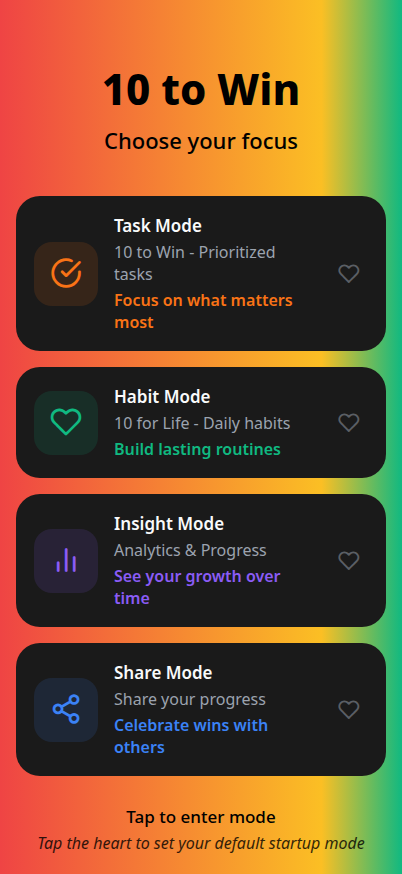
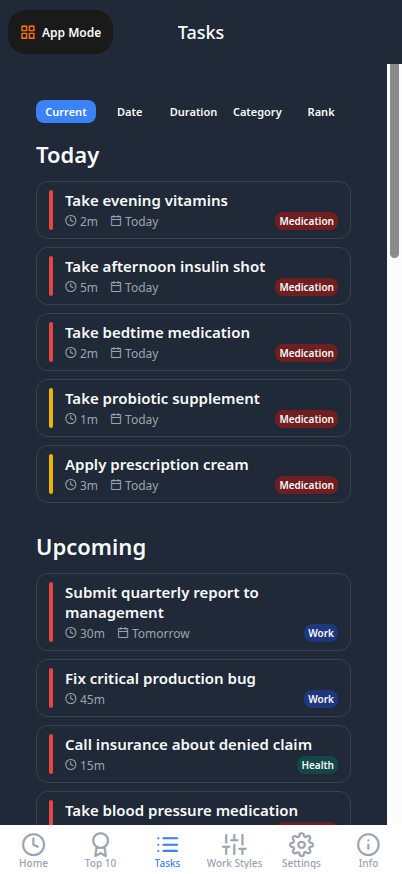
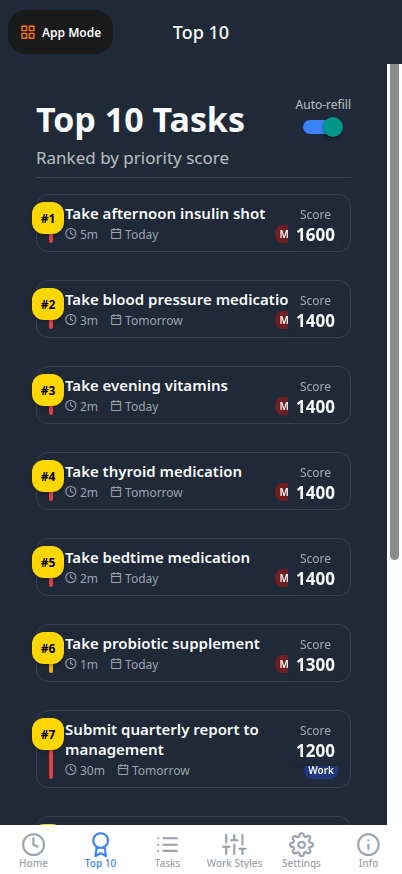
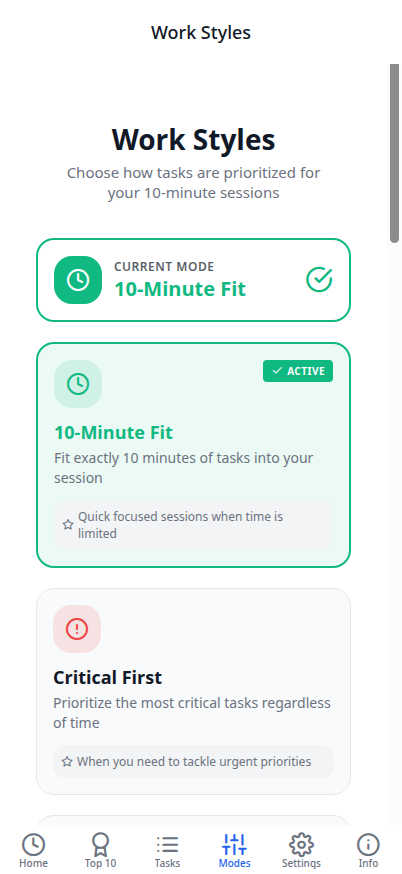
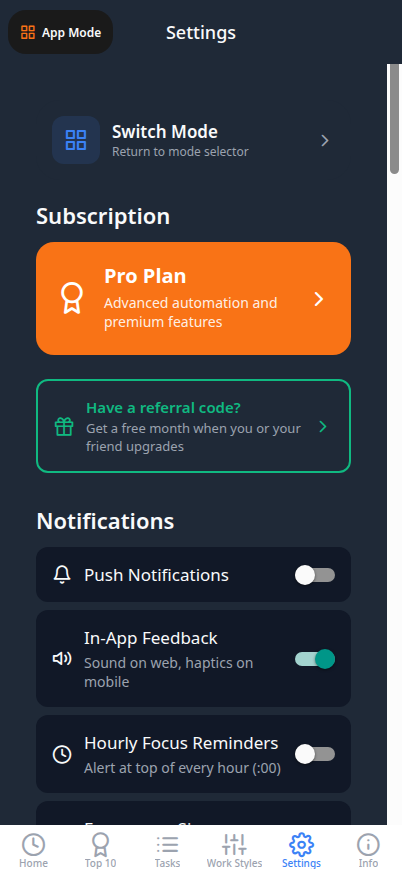
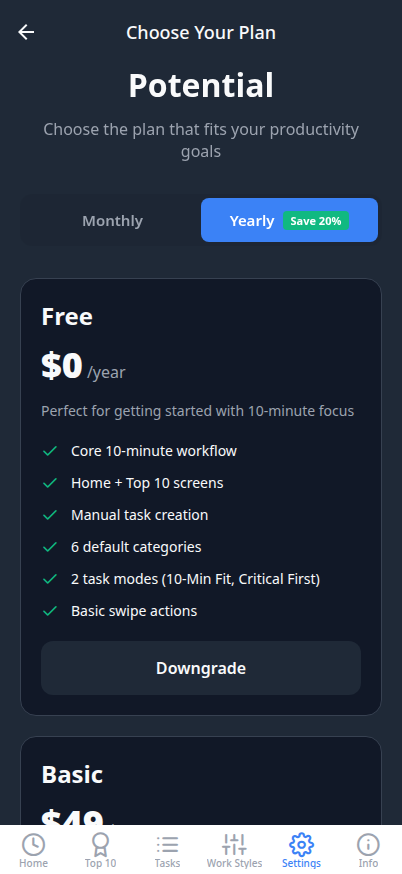
Use arrow keys to navigate through detailed screen explanations
Home Screen
Must Not Miss!
Shows emergencies, deadlines, and medication reminders
High Five!
Loads your next 5 highest-priority tasks
10 to Win
Quick wins totaling ~10 minutes with 1/2/3 task options
Swipe Actions
Swipe left to complete/snooze, right to skip/launch
All Tasks Screen
Full Task List
See all tasks regardless of priority score
Category Tabs
Quick navigation between task categories
Task Details
Tap any task to view and edit all properties
Bulk Actions
Manage multiple tasks with swipe gestures
Top 10 Screen
Global View
Tasks from ALL categories ranked by priority
Auto-Refill
Complete a task and #11 automatically appears
Star Badge
The #1 priority task gets a special star indicator
Live Scores
See actual priority scores for each task
Quick Add Task
Urgency Level
Emergency, Urgent, Moderate, or Low priority
Time Estimate
Set how long the task will take (1-60+ min)
Due Date
Optional deadline for time-sensitive tasks
Category
Assign to Work, Personal, Health, or custom
Settings Screen
Notifications
Set check-in times and do-not-disturb periods
Todoist Sync
Connect your Todoist account for cloud sync
VIP Access
Enter promo codes to unlock Pro features free
Theme
Choose Light, Dark, or System automatic mode
Upgrade Screen
Plan Comparison
Side-by-side view of Free, Basic, Pro, Lifetime
Power Boosts
Optional $10 add-ons for premium features
Secure Payment
Stripe-powered checkout with Apple/Google Pay
Restore Purchases
Recover previous subscriptions on new devices
Smart Priority System
Our 14-factor algorithm calculates priority scores for each task
5 Basic Factors (68%)
- Deadline: +1200 max for same-day
- Urgency: +100 to +1000
- Importance: +100 to +500
- Future Impact: -300 to +300
- Snooze Penalty: +50 per snooze
9 Advanced Factors (32%)
- Blocks Others: +300 if blocking
- Delay Consequence: +300 max
- Stakeholder: +300 if waiting
- + 6 more advanced factors
Learn more at 10towin.co/taskrank.html
Screen Mapping
Two views for different purposes - both powered by smart prioritization
Home Screen
- Three action buttons: Must Not Miss!, High Five!, 10 to Win
- Answers: "What should I do NOW?"
- Compact task cards with duration, date, category
- Quick actions via swipe gestures
- 10 to Win timer with task list
Top 10 Screen
- Always shows all 10 highest-priority tasks
- Answers: "What's most important overall?"
- Cross-category global view
- Auto-refill when tasks complete
- Star badge on #1 priority task
Key Difference: Home = focus on now | Top 10 = big picture priorities
Subscription Plans
- ✓ 2 Task Modes
- ✓ Unlimited Tasks
- ✓ Basic Notifications
- ✓ 5 Task Modes
- ✓ Todoist Sync
- ✓ Priority Support
- ✓ All 10 Modes
- ✓ Launch Actions
- ✓ Long-Term Projects
- ✓ Everything in Pro
- ✓ All Future Updates
- ✓ Founding Member
Power Boost Add-ons
Premium features for paid subscribers - $10 one-time each
Zapier Integration Highlights
- Auto-import tasks from 5,000+ apps (Salesforce, HubSpot, Pipedrive)
- Webhook-based real-time sync with custom field mapping
Getting Started
Swipe Actions
Privacy & Security
Our Promise: Your productivity data is YOUR business. We respect that.
VIP Access
Free Pro Access
Permanent access to all Pro features at no cost.
YOUR EXCLUSIVE CODE
Also valid: FAMILY2025 • FRIENDS10
Scan to Download
10towin.co/vip
Built With Modern Tech
Frontend
- React Navigation 7+
- Reanimated for smooth 60fps
- AsyncStorage for local data
Backend
- Node.js + Express
- Drizzle ORM + PostgreSQL
- Resend for email